
The Terminal Client OVOS Was Missing

andlo
OVOS Contributor
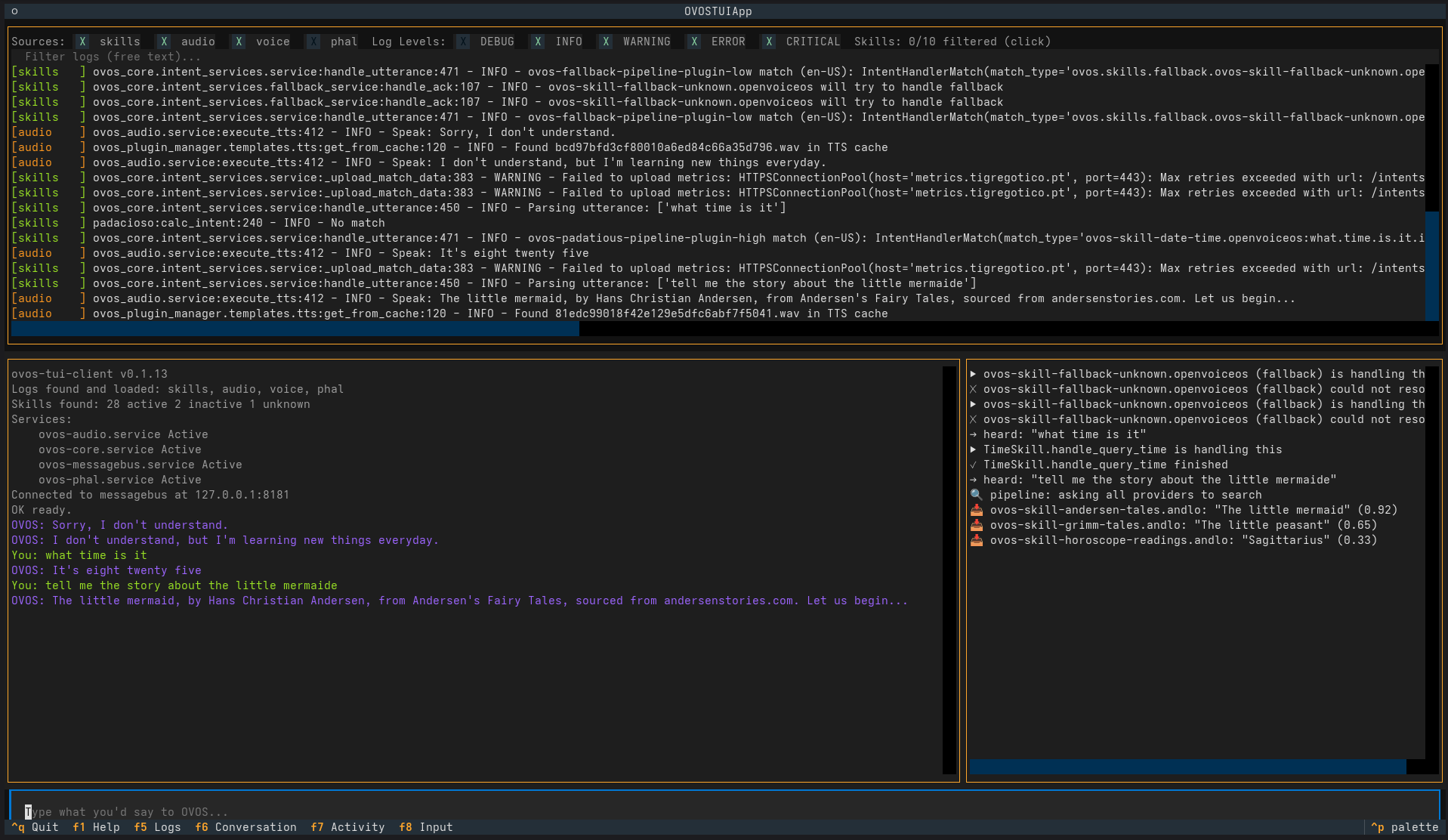
I'd been missing a working CLI client for a while - specifically for testing intents. Back in the Mycroft days I used the CLI client constantly - it was just how you tested things. Once it stopped working, I kept reaching for it out of habit and kept coming up empty. Typing an utterance and watching what actually happens is the fastest way I know to check whether a phrasing works, whether a skill is loaded, whether the pipeline is doing what you think it's doing - no wake word, no microphone, no speech-to-text accuracy getting in the way of the thing you're actually trying to test.
The trouble is, the obvious tools for this haven't kept up.
ovos-cli-client (last released back in March 2022) crashes
immediately on a fresh install - ModuleNotFoundError: No module named 'ovos_utils.configuration', a module that's since been
removed from current ovos_utils and never patched. neon-cli-client
pulls in a pyyaml~=5.4 pin that won't build on a modern Python/
setuptools without manually downgrading setuptools first. Neither is
really usable without real work just to get them running, let alone
maintained.
So I built ovos-tui-client - a split-pane terminal UI: logs, a normal
back-and-forth conversation, a live simplified feed of what's happening
on the bus, and a text input that stands in for your voice.
What it actually does
Three panes and a command palette, updating in real time as OVOS processes what you type:
- Logs - tails every OVOS service log it can find, filterable by source, level, free text, or a specific skill, live, without restarting anything.
- Conversation - what you typed and what OVOS said back, plus quiet status lines for everything else the tool does.
- Activity - a curated, plain-English feed of what's happening right now: which skill is handling the request, which fallback skill caught something nothing else understood (and whether it actually resolved anything), which providers answered a search and at what confidence.
- A searchable command palette for the rest - restart a stuck service, activate or deactivate a skill, check the intent pipeline order - results appearing right in the conversation pane, no popup windows.
None of this is information OVOS doesn't already expose somewhere -
it's all in the logs, all on the bus, all inspectable with
systemctl and existing tools if you go looking. What the TUI client
actually buys you is that it's fast and convenient enough that you
do look, instead of it being a chore you skip. That matters more
than it sounds like it should. Worth knowing the ecosystem already has
good single-purpose tools for pieces of this too - ovos-simple-cli
(bundled with
ovos-bus-client),
ovos-logs, and
ovos-busmon (a live
bus monitor with full JSON payload inspection and message injection)
among them - this one just tries to bundle the day-to-day pieces into
one screen.
What it caught, just from being easy to use
I've been using it heavily while working on
ovos-common-reading-pipeline-plugin,
and it's earned its keep. A few real things, all findable the old way
too - tailing logs, poking the bus by hand - just slower:
A "stop" that silently did nothing. Saying "stop" mid-story kept right on reading through several more paragraphs, no matter how many times I said it. The reading loop itself checked its own "should I keep going" flag correctly between every sentence - the actual problem was one layer up: the plugin was never registering itself as the currently active skill, so OVOS's global stop handling had no way to know it was the thing currently talking. Watching the activity feed made the missing piece obvious in a way that would have been much easier to miss scrolling past it in a full log file.
A crash swallowed silently inside ovos-core itself. Some
requests that should have worked - a story matched by title, plainly
correct - were quietly falling through to a generic fallback response
instead. Turned out to be a real TypeError inside ovos-core's own
intent-handling code, triggered by a missing default argument on my
end, caught and discarded rather than surfaced anywhere visible. The
fix was a one-line change once found; finding it meant noticing the
mismatch between "this utterance should clearly have matched" and
"the activity feed shows nothing from my plugin at all."
A vocabulary phrase quietly colliding with another skill. A fairly generic phrasing pattern was broad enough to also catch utterances meant for a completely different skill - only obvious once real phrases were tried against a real system with a full, ordinary set of skills loaded, not a clean test environment with just the one skill under test.
None of these needed the TUI client specifically - they needed someone to actually sit down, type real phrases, and watch what happened closely enough to notice something was off. What the tool changes is how often that actually happens, because it's no longer a five-minute setup tax before you can start.
Where it can go
It's genuinely usable today - the core loop works, and it's a solid replacement for the old CLI clients. Open items I know about: fuller support for Docker/Podman-based installs (detection already works, service start/stop/restart for containers doesn't yet), a persistent command-macro/slash-command system for repeated test scenarios, and probably a few more real bugs waiting to be found simply by more people typing more things into it.
References
- ovos-tui-client
- ovos-busmon - a live bus monitor, complementary to this
Help Us Build Voice for Everyone
OpenVoiceOS is more than software — it's a mission.
If you believe voice assistants should be open, inclusive, and user-controlled, there are many ways to help:
- 💸 Donate — support development, infrastructure, and long-term sustainability
- 📣 Contribute open data — share voice samples and transcriptions under open licenses
- 🌍 Translate — help make OpenVoiceOS accessible in every language
We're not building this for profit.
We're building it for people.